How to Fix YouTube Embeds Blocked by Cloudflare’s "Security Headers"

If you use Cloudflare, you have likely seen the "Managed Transforms" section under Rules. It offers a tempting one-click toggle: "Add security headers." While it’s a quick way to boost your security rating, it is often too rigid. For many site owners, enabling this feature comes with a frustrating side effect—it completely blocks YouTube video embeds.
📌 Disclaimer
While the "Ultimate" security setup is a Nonce-based CSP implemented directly within your application (origin server), that often requires additional development work. Hence this solution in this article is designed as a highly effective first step or an "Edge-based" shield. It is ideal for those who are migrating to Cloudflare or need to harden their site security immediately without modifying their core application code. If you have the resources for application-level changes, I recommend exploring a nonce-based approach for even tighter security.
⚠️ The Problem: Why YouTube Blocks
When you toggle "Add security headers" on, Cloudflare applies a set of strict headers that aren't aware of your third-party content. Two specifically break YouTube:
- Content-Security-Policy (CSP): This creates a "VIP list" of allowed content. Cloudflare's default version often limits this to
'self', meaning the browser is told to refuse anything from an external domain like YouTube. - Referrer-Policy: It often sets the value to
same-origin. YouTube's player needs to know which domain is embedding it to verify the license and load the video; if this info is stripped, the video fails to initialise.
💻 The Solution: A Custom Cloudflare Snippet
To fix this, we need to move from "Managed" (one-click) to "Custom" (code-based). By using a Cloudflare Snippet, we can maintain high security while manually whitelisting the specific YouTube domains we need.
Step 1: Disable the Managed Transform
You must first turn off the rigid setting to prevent it from conflicting with our new rule.
- In the Cloudflare Dashboard, go to Rules > Transform Rules.
- Select the Managed Transforms tab.
- Turn OFF "Add security headers."
Step 2: Create a Custom Snippet
We will now recreate these security headers manually, but with "YouTube-friendly" permissions.
- Go to Rules > Snippets.
- Click Create Snippet and name it
Manual Security Headers with YouTube. - Paste the following code into the editor:
/**
 * CLOUDFLARE EDGE SECURITY SNIPPET
 * * Purpose: This script enforces a centralized security policy at the Edge.
 * It ensures a consistent "A" grade by overriding origin headers and
 * surgically removing conflicting HTML meta tags before they reach the browser.
 */

export default {
  async fetch(request) {
    // 1. DYNAMIC ALLOWLIST DEFINITION
    // Replace these placeholders with your specific third-party service domains.
    const ALLOWED_SCRIPTS = "'self' 'unsafe-inline' 'unsafe-eval' https://cdn.example.com https://scripts.thirdparty.com";
    const ALLOWED_FRAMES  = "'self' https://video.provider.com https://forms.service.com";
    const ALLOWED_CONNECT = "'self' https://api.search-provider.com https://error-tracking.io wss://websocket.service.com";
    const ALLOWED_IMAGES  = "'self' data: https://images.cdn.com";
    const ALLOWED_STYLES  = "'self' 'unsafe-inline' https://fonts.googleapis.com";

    const MASTER_CSP = `default-src 'self'; script-src ${ALLOWED_SCRIPTS}; frame-src ${ALLOWED_FRAMES}; connect-src ${ALLOWED_CONNECT}; img-src ${ALLOWED_IMAGES}; style-src ${ALLOWED_STYLES}; font-src 'self' https://fonts.gstatic.com;`;

    const SECURITY_HEADERS = {
      "Content-Security-Policy": MASTER_CSP,
      "X-Content-Type-Options": "nosniff",
      "X-Frame-Options": "SAMEORIGIN",
      "Referrer-Policy": "strict-origin-when-cross-origin",
      "Strict-Transport-Security": "max-age=31536000; includeSubDomains; preload",
      "Permissions-Policy": "camera=(), microphone=(), geolocation=(), interest-cohort=()",
      "Cross-Origin-Opener-Policy": "same-origin-allow-popups"
    };

    const BLOCKED_HEADERS = [
      "X-Powered-By",
      "X-AspNet-Version",
      "Server"
    ];

    // Intercept the response from the origin server
    const response = await fetch(request);
    const contentType = response.headers.get("Content-Type") || "";

    // Optimization: Only process HTML documents
    if (!contentType.includes("text/html")) {
      return response;
    }

    /**
     * SEARCH & DESTROY: HTML REWRITER
     * CMS modules or third-party plugins often inject their own CSP via <meta> tags.
     * Browsers follow the 'strictest' rule found, which often breaks functionality.
     * We physically remove these tags at the Edge to ensure our Header is the single source of truth.
     */
    const rewriter = new HTMLRewriter().on('meta[http-equiv*="Content-Security-Policy"]', {
      element(element) {
        element.remove();
      },
    });

    const transformedResponse = rewriter.transform(response);
    const newHeaders = new Headers(transformedResponse.headers);

    // Remove any existing/conflicting CSP headers from the origin server
    newHeaders.delete("Content-Security-Policy");
    newHeaders.delete("Content-Security-Policy-Report-Only");
    newHeaders.delete("X-Content-Security-Policy");

    // Inject the unified security header set
    Object.keys(SECURITY_HEADERS).forEach((name) => {
      newHeaders.set(name, SECURITY_HEADERS[name]);
    });

    // Remove 'chatty' headers that leak server technology details
    BLOCKED_HEADERS.forEach((name) => {
      newHeaders.delete(name);
    });

    return new Response(transformedResponse.body, {
      status: response.status,
      statusText: response.statusText,
      headers: newHeaders,
    });
  },
};
/**
* CLOUDFLARE EDGE SECURITY SNIPPET
* * Purpose: This script enforces a centralized security policy at the Edge.
* It ensures a consistent "A" grade by overriding origin headers and
* surgically removing conflicting HTML meta tags before they reach the browser.
*/
export default {
async fetch(request) {
// 1. DYNAMIC ALLOWLIST DEFINITION
// Replace these placeholders with your specific third-party service domains.
const ALLOWED_SCRIPTS = "'self' 'unsafe-inline' 'unsafe-eval' https://cdn.example.com https://scripts.thirdparty.com";
const ALLOWED_FRAMES = "'self' https://video.provider.com https://forms.service.com";
const ALLOWED_CONNECT = "'self' https://api.search-provider.com https://error-tracking.io wss://websocket.service.com";
const ALLOWED_IMAGES = "'self' data: https://images.cdn.com";
const ALLOWED_STYLES = "'self' 'unsafe-inline' https://fonts.googleapis.com";
const MASTER_CSP = `default-src 'self'; script-src ${ALLOWED_SCRIPTS}; frame-src ${ALLOWED_FRAMES}; connect-src ${ALLOWED_CONNECT}; img-src ${ALLOWED_IMAGES}; style-src ${ALLOWED_STYLES}; font-src 'self' https://fonts.gstatic.com;`;
const SECURITY_HEADERS = {
"Content-Security-Policy": MASTER_CSP,
"X-Content-Type-Options": "nosniff",
"X-Frame-Options": "SAMEORIGIN",
"Referrer-Policy": "strict-origin-when-cross-origin",
"Strict-Transport-Security": "max-age=31536000; includeSubDomains; preload",
"Permissions-Policy": "camera=(), microphone=(), geolocation=(), interest-cohort=()",
"Cross-Origin-Opener-Policy": "same-origin-allow-popups"
};
const BLOCKED_HEADERS = [
"X-Powered-By",
"X-AspNet-Version",
"Server"
];
// Intercept the response from the origin server
const response = await fetch(request);
const contentType = response.headers.get("Content-Type") || "";
// Optimization: Only process HTML documents
if (!contentType.includes("text/html")) {
return response;
}
/**
* SEARCH & DESTROY: HTML REWRITER
* CMS modules or third-party plugins often inject their own CSP via <meta> tags.
* Browsers follow the 'strictest' rule found, which often breaks functionality.
* We physically remove these tags at the Edge to ensure our Header is the single source of truth.
*/
const rewriter = new HTMLRewriter().on('meta[http-equiv*="Content-Security-Policy"]', {
element(element) {
element.remove();
},
});
const transformedResponse = rewriter.transform(response);
const newHeaders = new Headers(transformedResponse.headers);
// Remove any existing/conflicting CSP headers from the origin server
newHeaders.delete("Content-Security-Policy");
newHeaders.delete("Content-Security-Policy-Report-Only");
newHeaders.delete("X-Content-Security-Policy");
// Inject the unified security header set
Object.keys(SECURITY_HEADERS).forEach((name) => {
newHeaders.set(name, SECURITY_HEADERS[name]);
});
// Remove 'chatty' headers that leak server technology details
BLOCKED_HEADERS.forEach((name) => {
newHeaders.delete(name);
});
return new Response(transformedResponse.body, {
status: response.status,
statusText: response.statusText,
headers: newHeaders,
});
},
};📌 How This Script Works
For those who aren't developers, here is why this approach is superior:
- Targeted Whitelisting (
frame-src): We explicitly tell the browser that iframes fromyoutube.comandyoutube-nocookie.comare trusted. - Asset Support (
img-src/script-src): It allows the browser to fetch video thumbnails and player logic from YouTube's static servers (ytimg.com). - Smart Referrers: We use
strict-origin-when-cross-origin. This allows YouTube to see that the request came from your domain (so the player works) without leaking the full, private URL of your page. - The HTML Filter: The script includes a check to ensure these headers only apply to your web pages, preventing them from accidentally breaking your images, CSS files, or API calls.
Step 3: Deploy the Rule
- Click Save and Deploy.
- When incoming requests match: Select All incoming requests (unless you only want this applied to specific pages).
✅ Verify the Results
The Results: Before vs. After
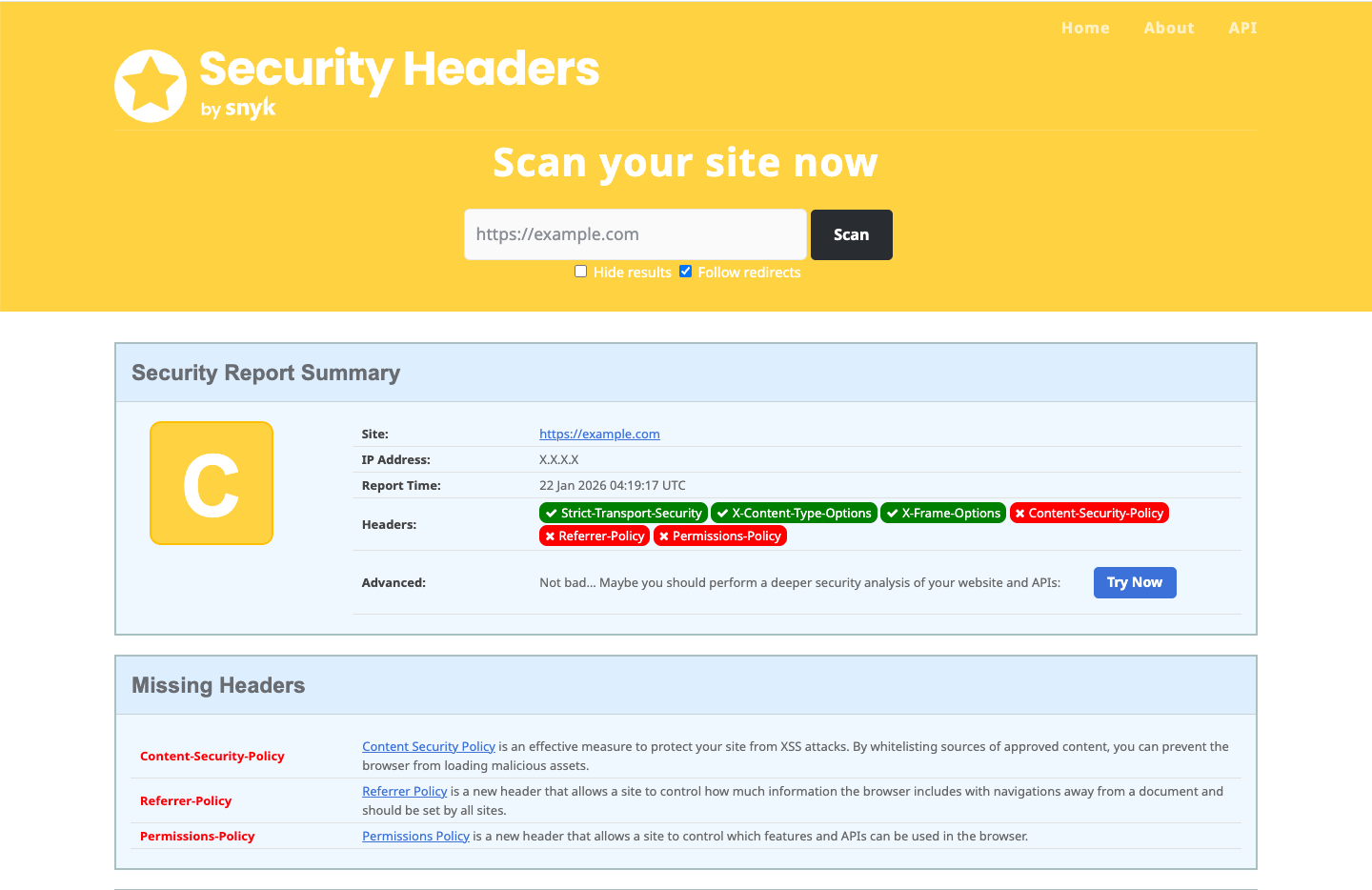
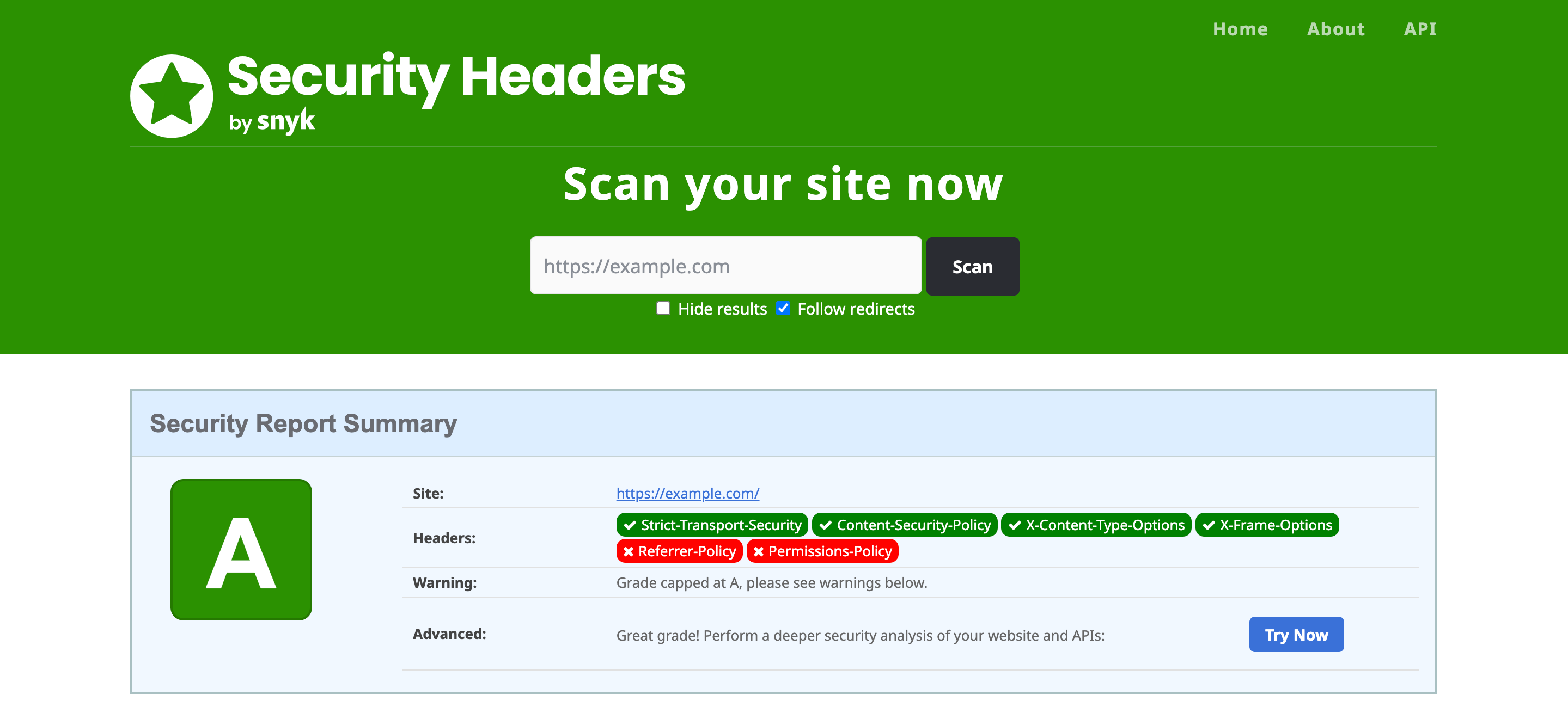
To verify the impact of these changes, I ran a scan using SecurityHeaders.com. This tool analyses the response headers of your site and gives you a grade based on how well you protect your visitors.
Below is the BEFORE and AFTER of the Security Headers test:
💡 Tips
If you use other third-party tools like Vimeo, Google Analytics, or Stripe, you can simply add their domains to the relevant lines in the Content-Security-Policy section of the script above!
__________
🛟 Need Help With Your Security Posture?
Getting a Content Security Policy (CSP) right is difficult because it sits at the intersection of security, developer workflow, and third-party marketing needs. If you’re currently struggling with broken scripts or failing security audits, I can help you find a sustainable solution.
My experience includes:
- Aggressive Attack Mitigation: I have previously stepped in to safeguard client sites under active, aggressive attacks, implementing immediate edge-level protections to stabilise the environment while hardening the origin.
- C&A Compliance: I’ve supported organisations through rigorous Certification and Accreditation (C&A) audits. This involved moving past basic whitelisting to implement high-security, nonce-based CSPs within the codebase to meet strict compliance standards.
- Infrastructure Baseline: I help teams define and deploy baseline security policies via Cloudflare or at the server level.
If you need a technical partner to review your current headers or architect a more resilient security posture, I’m happy to chat — Contact me on LinkedIn.

